
5 Claude Connectors Worth Setting Up: Perplexity, Firecrawl, PostHog, Playwright and Composio
A short video recommends five Claude connectors. Here is what each one does, what you need to set it up, which job it fits and what to watch out for before you connect it.
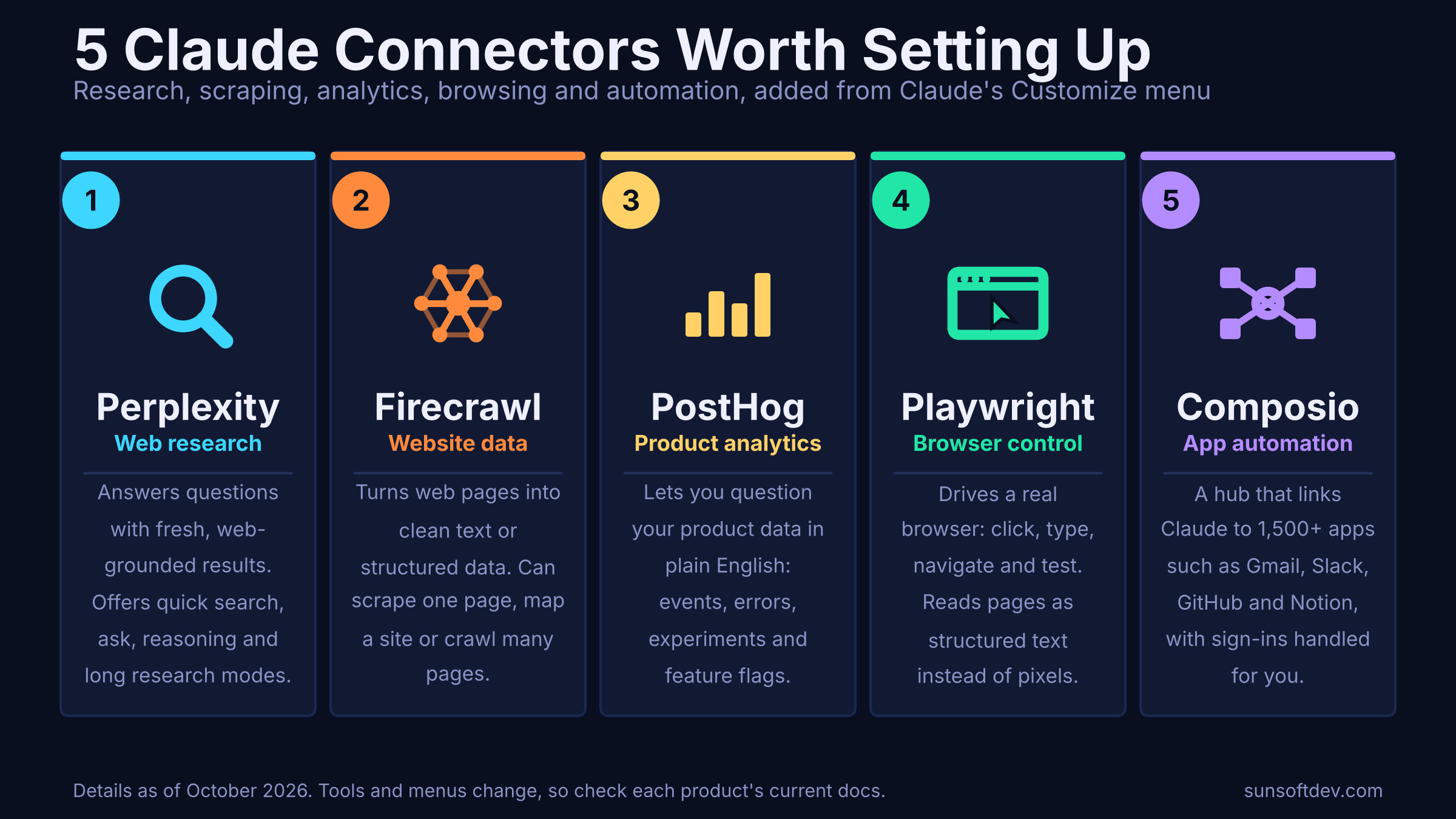
Claude is useful on its own, but it gets far more useful when it can reach things outside the chat window: the live web, your product data, a real browser, your work apps. Connectors are how that happens. A short video making the rounds recommends five of them, and the list is a good one because each connector covers a different job. This guide explains what each does, what you need to set it up, and what to think about before you connect it.
What a connector is
A connector is a bridge between Claude and another service. Most are built on the Model Context Protocol (MCP), an open standard that lets an AI app call tools that live elsewhere. You ask a question in plain English, Claude decides which tool to call, the connector carries the request to the service, and the result comes back for Claude to read and explain.
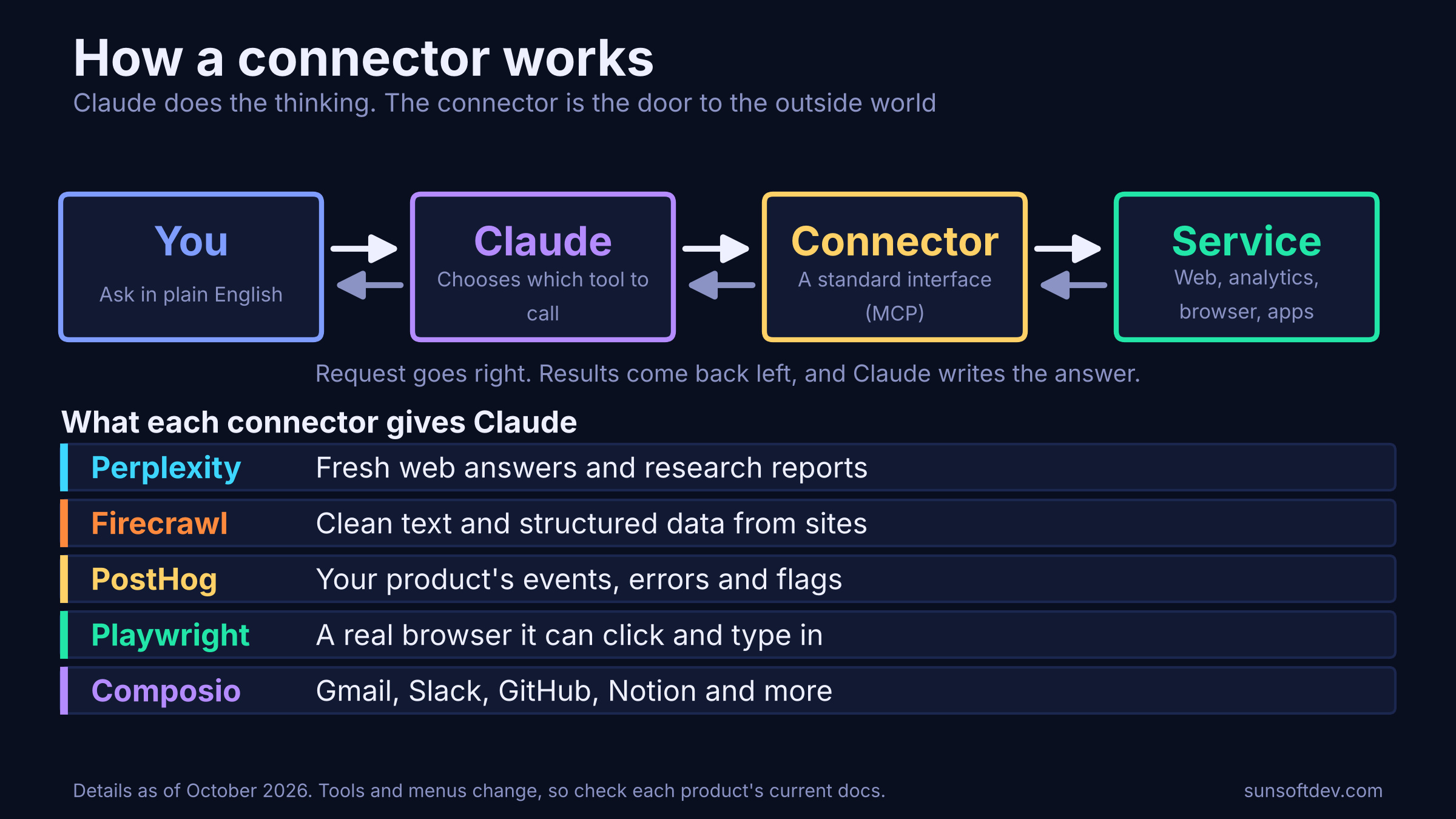
You manage them from the Customize area of Claude, under the Connectors tab, where your connected services are listed and new ones can be added. Some connectors are listed in Claude's directory, while others are added as custom connectors by pointing Claude at a server. Menus and names change over time, so treat this as a map rather than a click-by-click guide.
1. Perplexity: fresh answers from the web
Perplexity's connector gives Claude access to web-grounded search and research. Its server exposes four tools: a direct web search with ranked results, a quick ask for fast questions, a reasoning mode for step-by-step analysis, and a research mode that builds longer, multi-step reports. The research mode can take several minutes to finish, which is normal.
Best for: questions where the answer changes over time, such as current prices, recent announcements or "what is the latest on X."
You need: a Perplexity API key from its API portal. The key is separate from a regular Perplexity subscription.
Watch out for: API usage is typically metered, so long research runs can add up. Ask Claude to use the quick modes for simple lookups.
2. Firecrawl: turn websites into usable data
Firecrawl is built for getting content out of websites in a form an AI can use. Its tools can scrape a single page, scrape many known pages in a batch, map the URLs on a site, search the web, crawl many pages, extract structured data using a schema, and run multi-source research.
Best for: competitor research, collecting product or pricing information, turning documentation into something Claude can read, or pulling a table out of a messy page.
You need: a Firecrawl API key for the cloud service. If you self-host, you can point the connector at your own instance instead.
Watch out for: large crawls can return more text than Claude can comfortably handle, so keep limits low and start with a single page. Respect each site's terms and robots rules.
3. PostHog: ask your product data questions
PostHog is a product analytics platform, and its connector lets Claude work with the data inside it. You can ask for top error groups with stack traces, run analytics and SQL-style queries, work with feature flags and experiments, and more, all from a prompt. The server address is published in PostHog's documentation, and sign-in is handled through your PostHog account, with US or EU routing based on where your account lives.
Best for: founders and product teams who want answers without building a dashboard first. For example: which errors affect the most users this week, or how a recent change moved a key metric.
You need: a PostHog account with a project that has data.
Watch out for: this connector can do more than read. Feature flags and issue settings can be changed, so review any write action before approving it. Some AI-powered tools may also count toward AI usage in your PostHog plan.
4. Playwright: a real browser for Claude to drive
Playwright, from Microsoft, is a browser automation framework, and its MCP server lets Claude drive a real browser. Instead of looking at screenshots and guessing coordinates, it reads a structured text snapshot of each page and refers to elements by ID, so it can click, type, fill forms, switch tabs and check what changed. It supports Chrome, Firefox, WebKit and Edge, and it offers a large toolset covering navigation, input, screenshots, network mocking and more.
Best for: testing your own web app end to end, filling repetitive forms, checking how a page behaves, and any task that has no API.
You need: Node.js on your computer. It runs locally, usually through a single npx command, and needs no API key.
Watch out for: it keeps login state and cookies between sessions by default. That is convenient, but it means Claude may be acting inside accounts you are signed into. Use a separate browser profile or test accounts for anything sensitive.
5. Composio: one door to many apps
Composio is a layer that sits between AI agents and the apps you use. It stores and refreshes sign-in tokens and exposes each integration as callable tools. It advertises more than 1,500 apps, including familiar names like Gmail, Slack, GitHub and Notion, and it lets you add custom MCP servers too.
Best for: workflows that touch several apps, such as summarizing unread email, opening a GitHub issue from a Slack thread, or logging results to a Notion page.
You need: a Composio account and an MCP address that identifies your user or connected account.
Watch out for: every tool call passes through Composio's cloud, so it adds another company to the path your data takes. Free plans have monthly usage caps, and enterprise controls such as zero data retention are sold on higher tiers. Check the current terms before you connect anything sensitive.
Which connector for which job
The five overlap a little, but each has a clear home. If you only start with one or two, match them to the work you actually do.
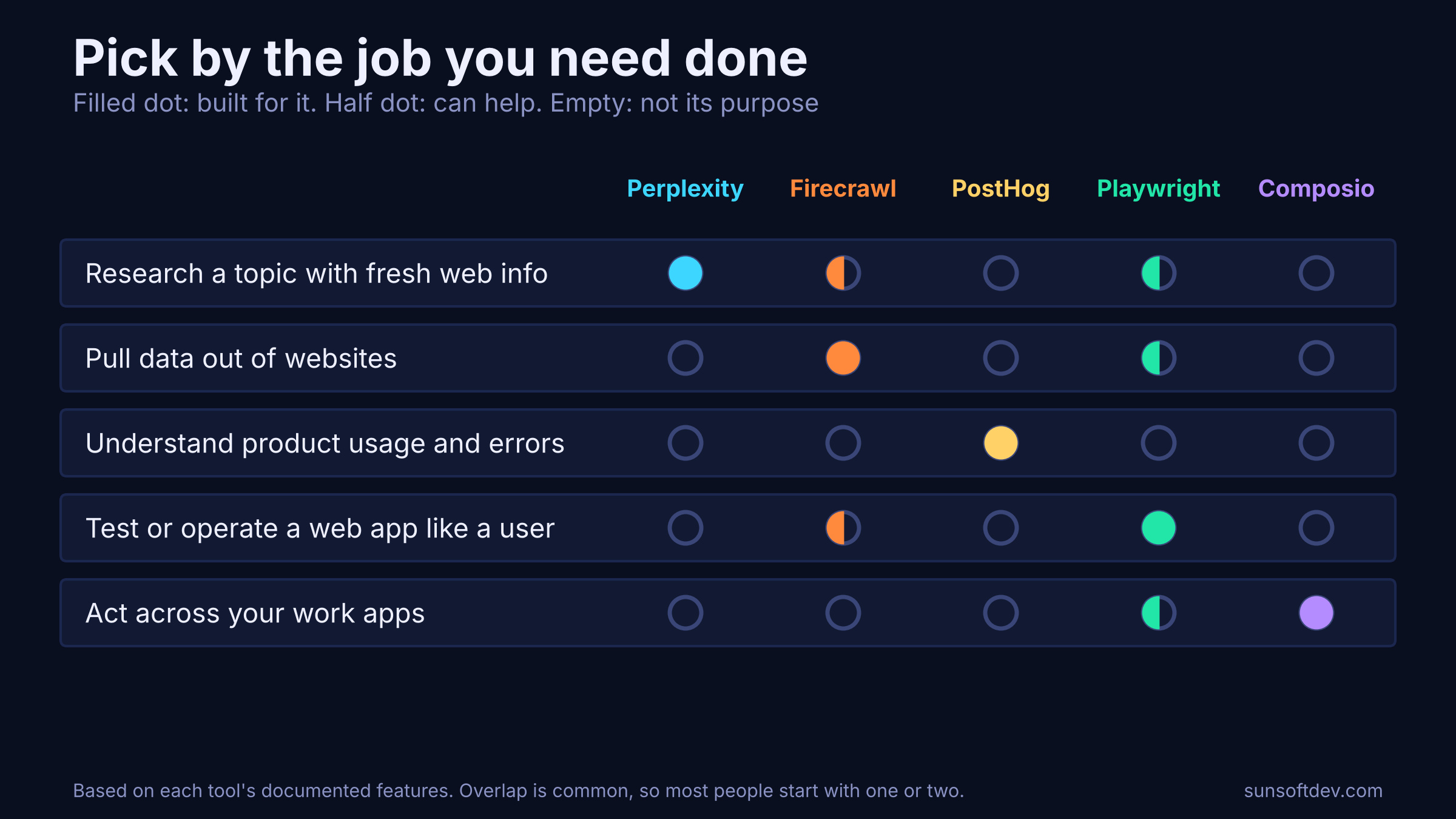
A simple starting point: use Perplexity if you research a lot, Firecrawl if you collect data from the web, PostHog if you run a product, Playwright if you build or test web software, and Composio if your day lives across many apps.
What you need before you start
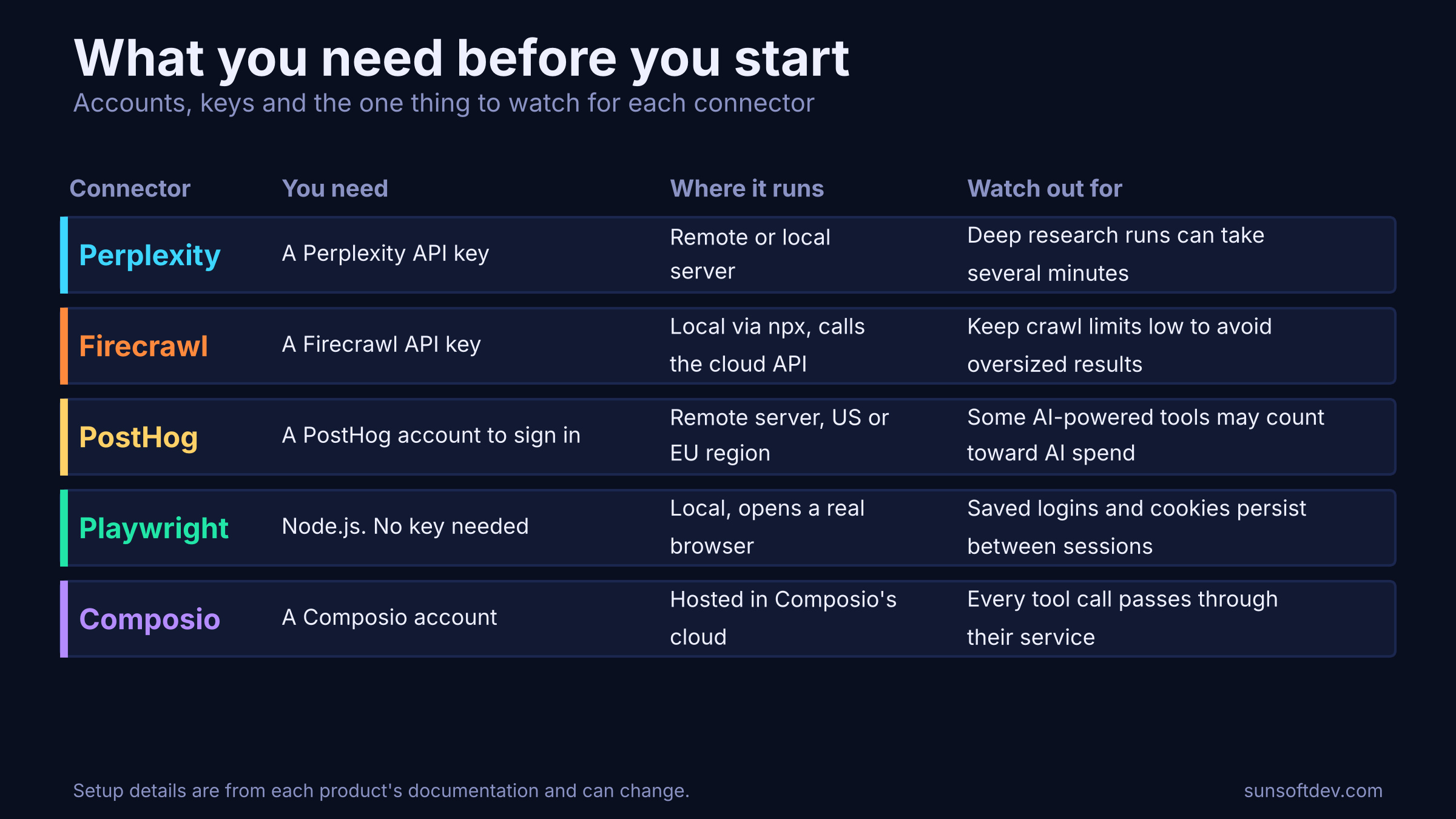
Most of the setup friction comes from accounts and keys rather than from Claude. Gather these first and the rest is quick.
More power means more to protect
Connectors are not equally risky. A connector that only reads public web pages can do little harm. One that can change feature flags, drive a browser with saved logins or write into your email and chat apps can do real damage if it is misused or if Claude misunderstands a request.
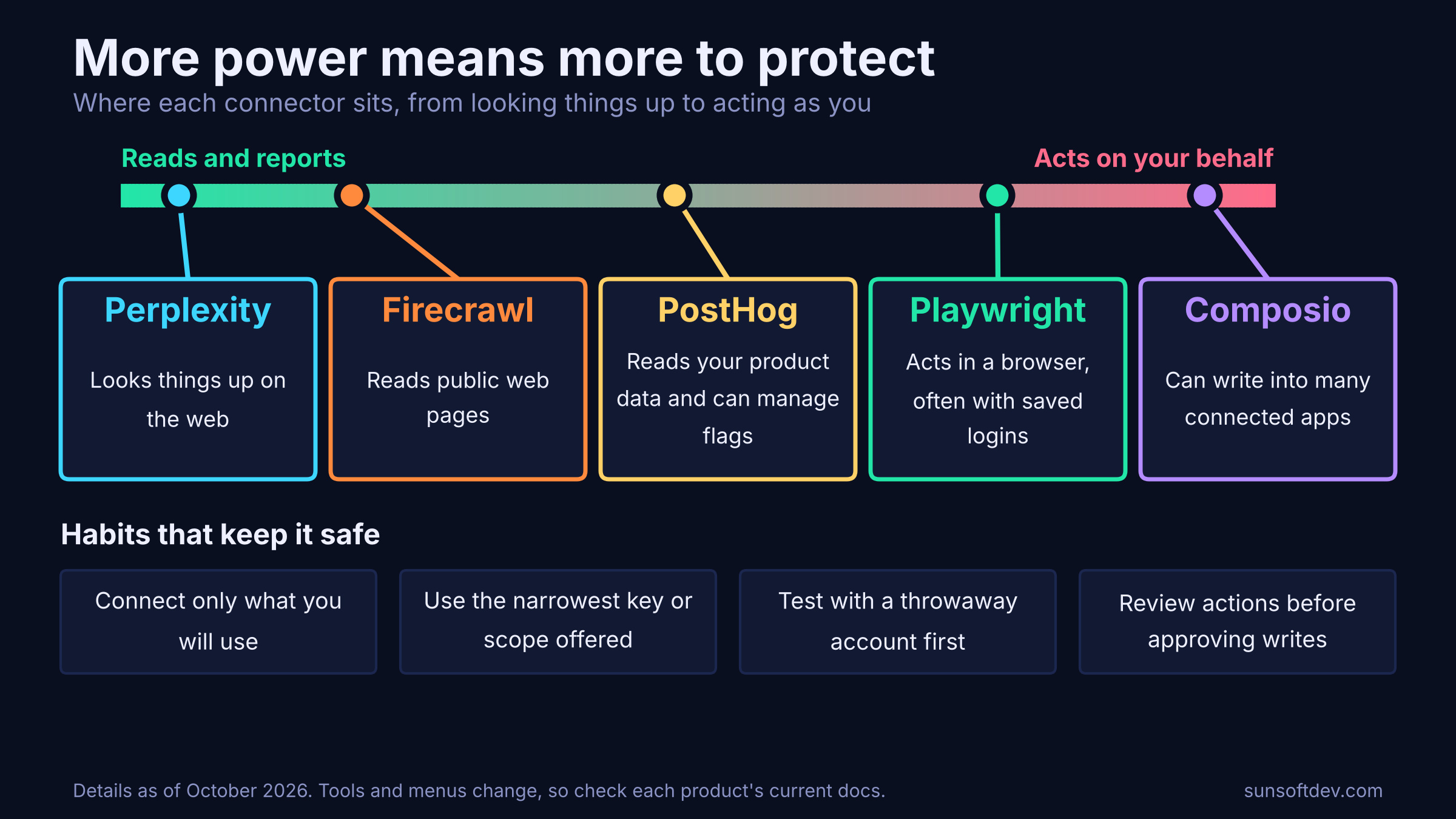
A few habits keep things safe:
- Connect only what you will use. Every connector is another door.
- Use the narrowest key or permission available. Read-only access is enough for many tasks.
- Test with a throwaway account first. Especially for browser control and app automation.
- Review actions before approving writes. Treat anything that sends, deletes or changes as something to read twice.
- Be careful with untrusted content. Web pages and messages can contain text that tries to steer an AI. Do not let Claude act on instructions found in content you did not write without checking.
A sensible way to begin
Start small. Pick the single connector that matches a task you already do every week, set it up, and use it for a few days. Check what it actually did, not just what it said it did. Then add a second one only if there is a real gap. Five connectors are not better than two that you understand well.
Prices, limits, features and menu names for these products change often. Confirm current details in each product's documentation before you rely on them.